
MovieBox vs MovieBox Pro: The Real Differences
Updated · Reviewed by the Editorial Team
Search for either name and you'll find both mixed together, often on the same page. It's the single biggest source of confusion around these apps. So let's settle it: Movie Box Pro and the regular app are two separate products, made by different teams, with different rules.
Side-by-Side Comparison
| MovieBox | MovieBox Pro | |
|---|---|---|
| Developer | COIHUB TECHNOLOGY | Separate team with its own website |
| Package name | com.community.oneroom | Different package |
| Sign-up | Not needed to start watching | Google sign-in, often with an invite code |
| Free plan | Yes, with optional premium | Yes, with lower video quality |
| Paid plan | In-app premium | VIP and family plans |
| Content focus | Hollywood, Asian dramas, anime, short dramas, music | Mostly Hollywood movies and TV series |
| Community features | Ratings, reviews and rooms | Limited |
| Android TV | Sideload the same APK | Separate TV app for paid members |
| Latest version | 4.0.04.1117.03 | Updated separately |
What Makes the Regular App Different
The regular app is built for people who want everything in one place without jumping through hoops. You install it, open it, and you're watching within a minute. It leans heavily into Asian content: Korean, Chinese and Thai dramas show up on the home feed next to Hollywood releases, and there's a dedicated short drama section with quick vertical episodes.
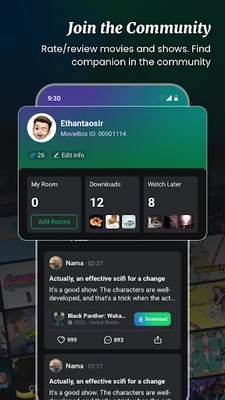
It also has a social side most people don't expect. You can rate titles, write reviews and join rooms where fans talk about a show, which is the screen you see above.
What Makes MovieBox Pro Different
The Pro version feels more like a classic streaming service. It's organized around a big Hollywood catalog, and its free plan plays at a lower resolution than the paid one. Access usually starts with a Google sign-in, and new users often need an invite code before streaming unlocks. Paid members get an account that works across Android, Android TV and some other devices.
Why the Invite Code Message Appears
If an app asks you for an invite code, you have the Pro version installed. The regular app never asks for one, and a MovieBox Pro APK download from a random site won't change that. Just uninstall it, grab the regular APK file, and check that the package name is com.community.oneroom after installing.
Which One Should You Choose?
- Pick the regular app if you want quick access with no account, love K-dramas or anime, and like offline downloads on your phone.
- Pick MovieBox Pro if you mainly watch Hollywood titles, don't mind signing in, and plan to use a paid plan on a TV.
For most people we talk to, the regular app is the easier start. You can always read the full Movie Box guide for everything it can do, or learn how to watch movies online and offline with it.
Frequently Asked Questions
Is MovieBox Pro an updated version of the regular app?
No. They are separate apps from different teams. Installing one does not update the other.
Can I use the same account on both apps?
No. Each app has its own accounts and its own plans.
How do I know which app I have installed?
Open Settings, Apps, then the app. The regular version uses the package name com.community.oneroom.